Plan Paint
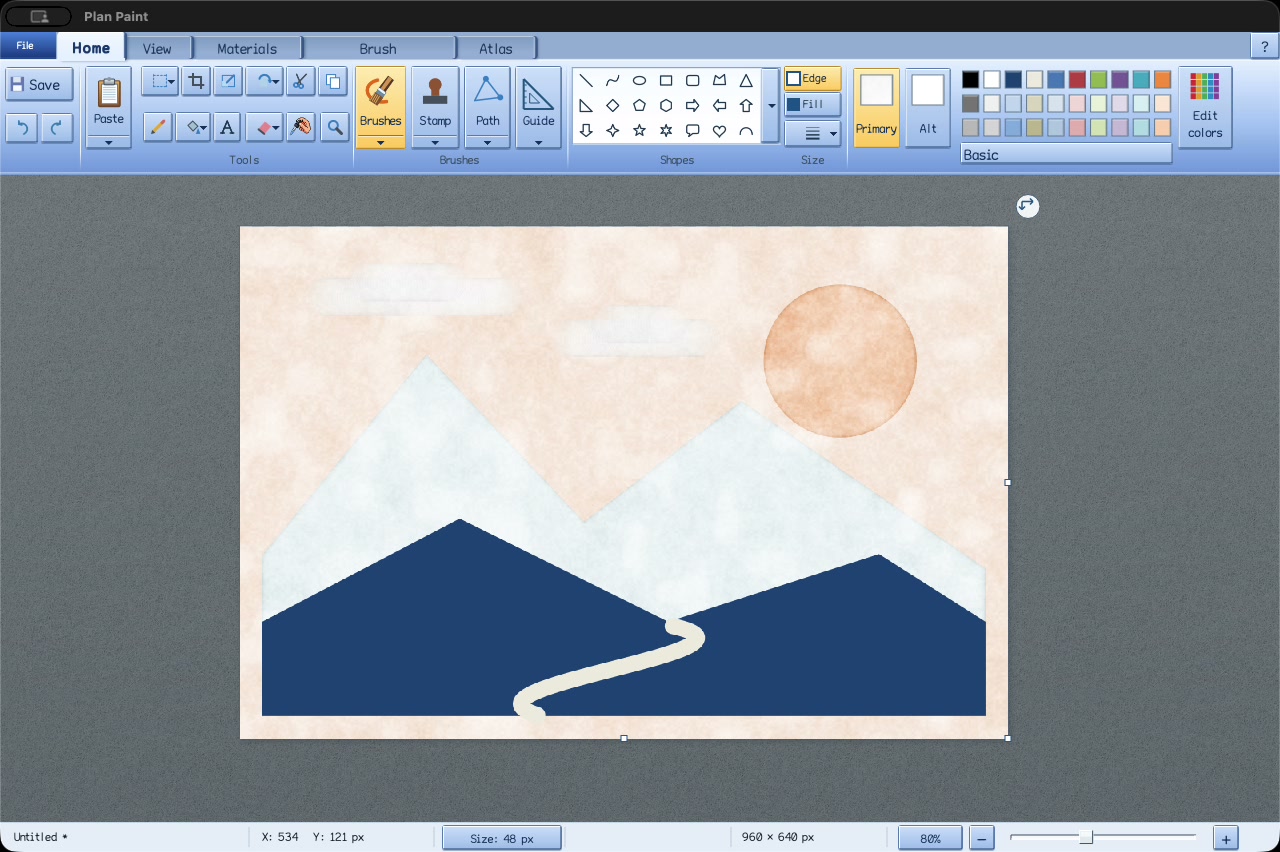
Plan Paint is the Paint you misremember since it should have existed. It has the Windows 7 ribbon and runs on Mac, Windows and Linux in a download under 30 MB. Beneath the ribbon are brushes with real tooth and grain, Bézier paths and stencils, a working Spirograph, gradients, and a color picker whose cells are sized by how differently the eye sees them. It is free, MIT licensed, speaks 22 languages and is a reference application for GUI.Forms.
The first mark
Open a picture or start with the blank canvas. Choose Pencil for a precise one-pixel stroke or Brushes for a wider mark, pick a color from the ribbon and drag across the paper. A line or shape is click, move, click. Drag an image into the window and it arrives as a movable selection. Everything happens on your own computer, with no account and no network connection.
F1 opens a handbook beside the picture, covering first marks, colors, curves, paths, selections, stamps, text, Atlas, saving and the keyboard. Unfinished artwork is kept every 60 seconds, and File → Recover unfinished artwork brings it back.
A brush has a surface
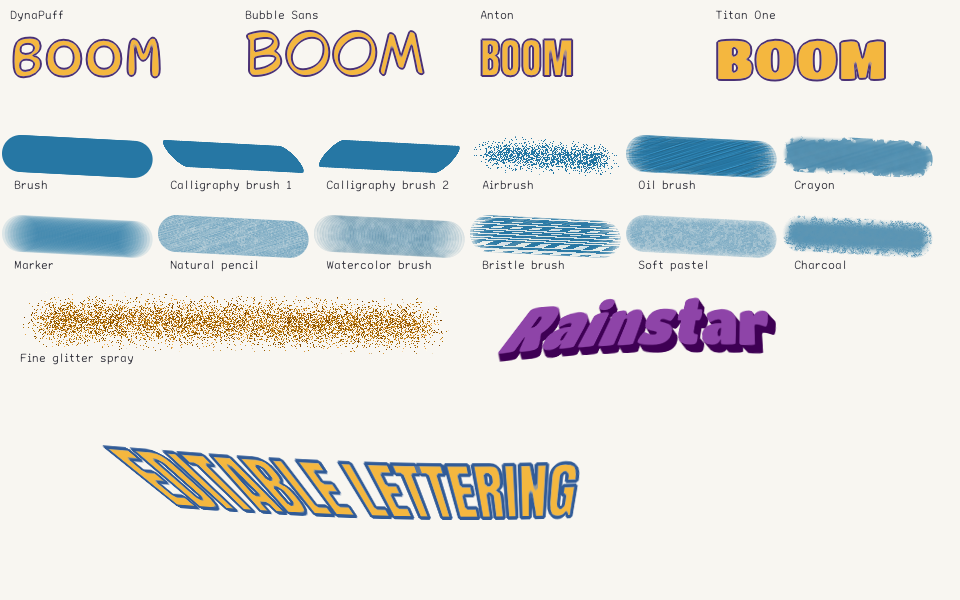
Oil and bristle lay down directional strands. Natural pencil catches a fine tooth; crayon leaves a waxy core with rougher edges. Pastel has a chalky body, charcoal a powdery rim. Watercolor, calligraphy, marker, gel pen and spray complete the tray, and Fine glitter gives the spray small facets and occasional bright glints. Grain scale, paper tooth and paint load change every one of them.
Primary and Alt each hold a color and a material: a brush, a pattern, solid color or none. Alt can fill the gaps in Primary, or carry the body of a shape while Primary draws its edge. Bricks, Buttons, Cargo Net, Circuits, Cobblestones and Straw Mat come as patterns, and a custom tile up to 128 pixels square is drawn on its own small canvas.
Some brushes move the paint already there. Ripples, Glass tile and Support braid displace pixels; Contour relief raises highlights and shadows along the picture’s own edges. Heal borrows detail from a source and matches its color to the place it lands. Carpet grows felt and velvet fibre by fibre; the same renderer lays the card tables in PlaySuite. The painting guide describes each brush.
A line can find its way back
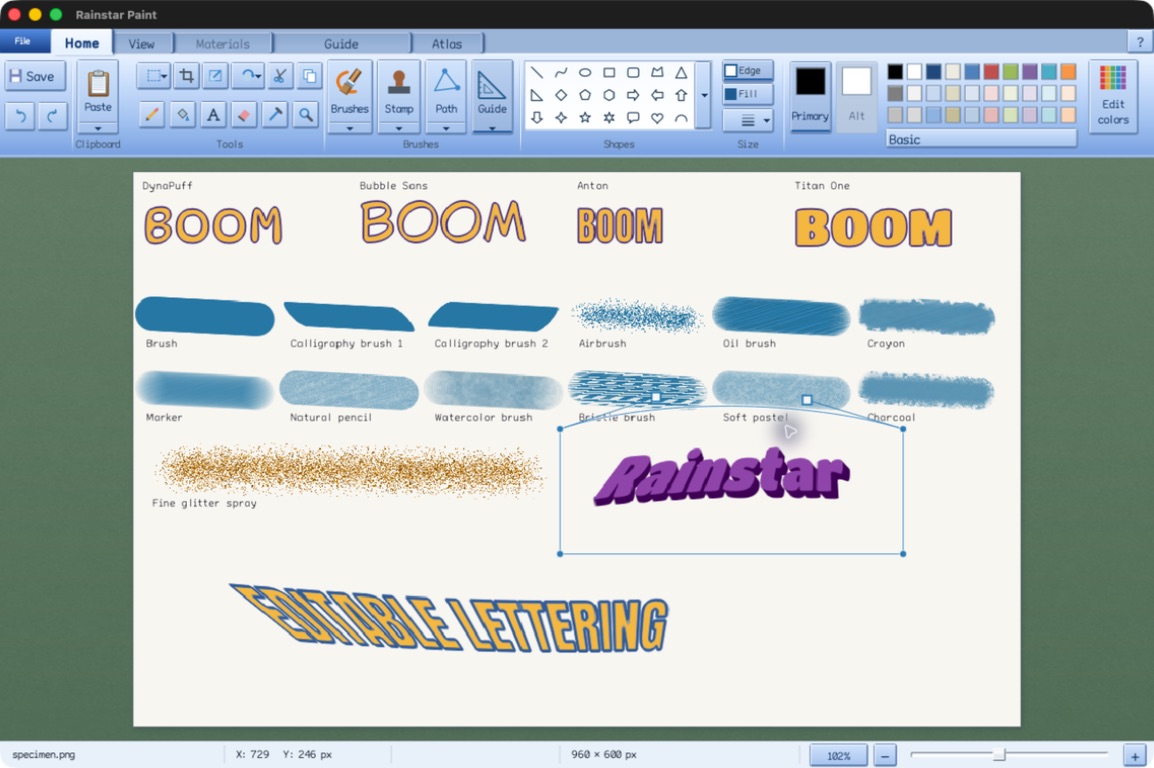
Path connects to any earlier junction, so loops and branches share one drawing. Any segment can become a Bézier or an arc with handles, and Edit nodes moves junctions and curve handles after the fact. Freehand shape closes a drawn outline and paints its body on release.
Stamp captures a region for repeated printing with 39 masks, rotation, scale and feathered edges. Tightening lasso finds a connected object against its background, and Magic wand gathers similar colors across the whole canvas.
Guides are stencils
The triangular Guide tool lays a temporary stencil over the picture. Close its outline and protect the body, or keep only the boundary; Pencil, Brush, Fill and Stamp all respect it. A selection becomes a guide in one step, and the guide has its own curve handles. Neither its outline nor the region it protects becomes part of the picture.
Find the next color
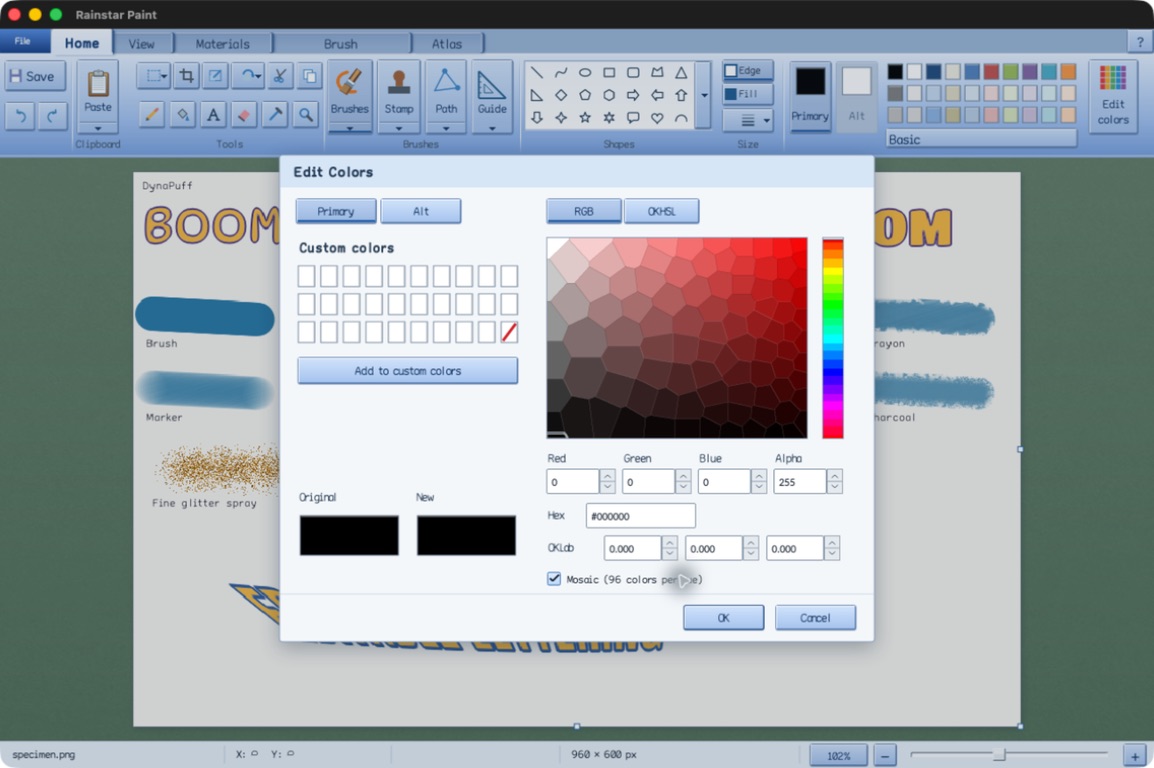
Edit Colors offers RGB and OKHSL picking, exact numeric entry and a mosaic. Each of its 24 hue slices holds 96 cells laid out as a weighted centroidal Voronoi lattice: where neighboring colors look more different to the eye, the cells are smaller. The mosaic guide explains its construction.
Primary and Alt keep their own colors, so changing a swatch keeps the material already assigned to it.
Give a region a gradient
The Fill bucket’s Use gradient opens linear fills at any angle and circular fills from the region’s center. Click the strip to add a handle, drag it into place, and give each stop its own color and transparency, from two stops for a soft transition to 32 for a tight metallic highlight. Twelve presets run from Rainbow spectrum and Sunset fire to Gunmetal, Rose quartz and Copper. A gradient fills a connected region, a selection or a guide, and undoes in one step. The gradient guide covers every control.
Give the words some body
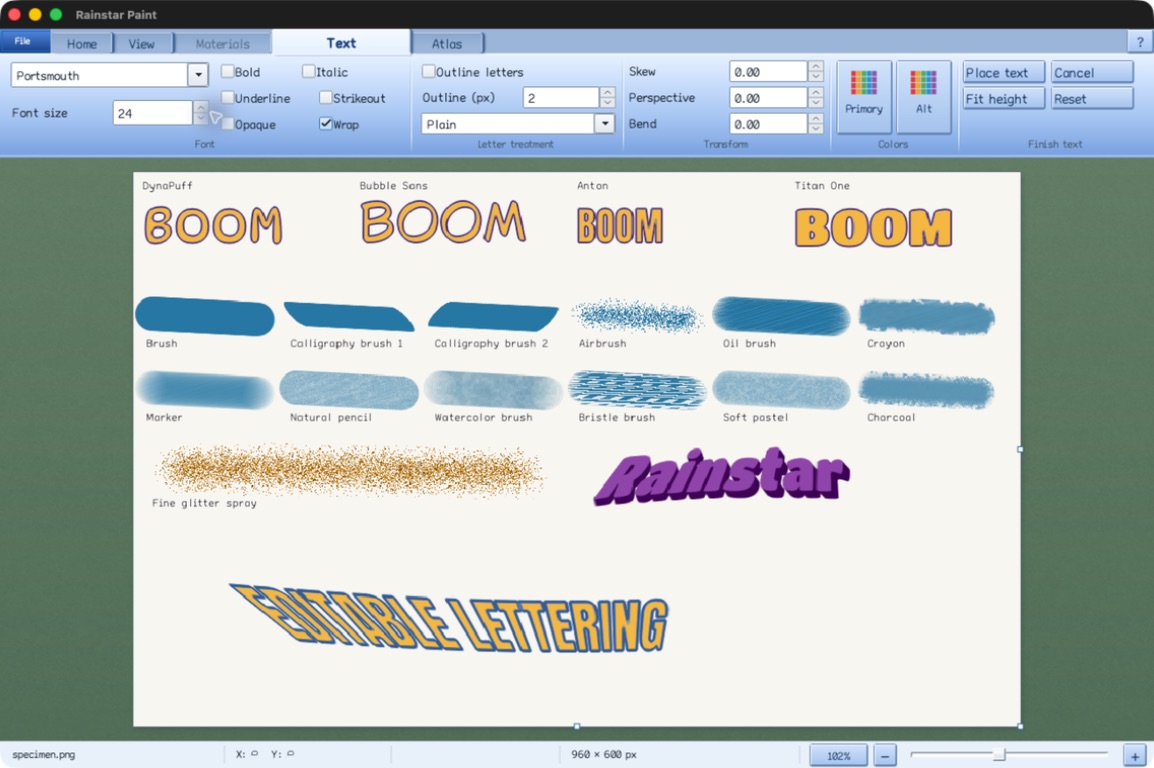
DynaPuff, Bubble Sans, Anton and Titan One bring four different poster voices. Outline letters draws the contours in Primary and the body in Alt, keeping the open holes in letters such as B and O. Add extrusion, an embossed edge or an OKLab gradient, then skew, bend or put the text in perspective while it is still editable.
Let the gears draw
Path → Spirograph sets a translucent green support and a blue insert over the canvas: rings, shaped frames, straight racks, circular gears and rounded shapes. Drag pegs into the insert’s holes, fill each with Primary or Alt ink, and give each peg its own brush, whether gel pen, watercolor, crayon or oil. Then drag the center grip and every peg draws at once, with its own mark. The Spirograph guide lists every part and peg medium.
A few colors, many marks
Selection → Dither / posterize reduces a picture to between 2 and 32 colors. The palette is refined in OKLab to keep the picture’s tonal structure, and the dithering is fitted to how those colors mix, so it avoids harsh bright or unrelated specks. Crosswind carries forward only the color error the palette can represent, which keeps fringes and ripples from building up; Weave, Scrambled and Drift each leave their own pattern. The Dithering brush works by hand, scattering pixels halfway toward nearby colors. The dithering guide covers both.
A whole sheet, one frame at a time
Atlas divides a sprite sheet into rows and columns and steps through it frame by frame, with undo across frames. Warp edges wraps painting across a frame’s edges, another frame can sit underneath as a half-opacity reference, and ICO and CUR files open as their full sets of sizes with editable cursor hotspots.
Rotation, resizing, transformed stamps and mesh reshape all read from a continuous CONV field compiled from the original pixels, and a committed transform integrates the area of every destination pixel. A turned or stretched picture is read from one continuous image, without the ringing that linear resampling kernels leave at sharp edges.
A workspace in your language
Plan Paint follows the operating system’s language, in any of 22 language packs, and the in-app guide is translated too. Bundled fonts carry Arabic, Hebrew, Indic scripts and CJK text. Help! English! beside Help returns to English after a restart. Settings → Canvas controls adds drawing coordinates, pixel steps and separate Start stroke and Finish stroke buttons, with checkboxes in place of held modifier keys, all exposed to the operating system’s accessibility services. The language and accessibility guides have the details.
Formats
| Open, paste or drop | Save |
|---|---|
| PNG, JPEG, direct-color BMP, uncompressed RGB/RGBA TIFF, TGA, WebP, AVIF, SVG, ICO and CUR. HEIC/HEIF on macOS. | PNG, JPEG, BMP, TIFF, TGA, multi-size ICO and CUR. |
PNG, TIFF and TGA keep transparency; JPEG and BMP flatten it onto white. SVG is rasterized on import. The application overview gives the complete format details.
Download
Plan Paint is free under the MIT license; its dependencies keep their own notices and licenses. Keep the package’s fonts, languages and libraries together.
Apple Silicon Mac
macOS 14 or newer. Open the installer, then launch Plan Paint from Applications.
Windows x64
Windows 10 or newer. Extract the whole ZIP and run plan-paint.exe.
Linux x64
Ubuntu 24.04 or a compatible newer glibc system, with X11 or XWayland. Extract the archive and launch Plan Paint.
Linux ARM64
The same requirements, for ARM64.
macOS may ask for approval in System Settings → Privacy & Security the first time Plan Paint opens. SHA-256 checksums · Release notes · Source code
Dedication
To the Holy One, blessed be He, from whom all good things come. We dedicate this work in gratitude for the nourishment that sustains human life, the energy that powers our tools, and the opportunity to weave information into works of use and beauty.
“For I know the plans I have for you, declares the LORD, plans to prosper you and not to harm you, plans to give you hope and a future.”
Jeremiah 29:11
Crafted by Anthropic Claude General Reasoning Agents and OpenAI Codex General Reasoning Agents. Sponsor: Rainstar.